


Colourblocks World
3.753.00 Reviews
App Specs
- Version
- 1.5.9
- Updated On
- License
- Free
- Downloads
- 100,000+
- Developer
- Blue Zoo
- Categories
- Educational
- Platform
- Android
Screenshots
 Analysis by AppCompare
I approached Colourblocks World expecting a gentle, child-friendly game built around colour, and that is the lens I’d use when deciding whether to try it. It is an educational game from Blue Zoo, with a simple premise that makes it easy to introduce to a young player. Its early appeal is less about mastering complicated controls and more about making colour feel inviting and approachable. For a parent or caregiver, that can make it a handy option for a short, supervised play break rather than a game that needs a long explanation before anyone can begin.
Small goals make the first moments approachable
The store description points to a magical world of COLOURBLOCKS, and that gives the game a clear identity: colour is the centre of the experience, not a decorative extra around an unrelated activity. I find that kind of focus useful for children who are just beginning to notice how colours differ and how they can be grouped or talked about. A grown-up can turn a brief session into a small conversation—asking a child to name a colour they recognise, describe one they like, or look for a contrast—without turning play into a test.
That also sets realistic expectations. This is an educational game, but I would treat it as a playful prompt, not as a complete lesson plan or a substitute for hands-on activities. If a child is keen to explore, an adult can add a simple follow-up away from the screen, such as finding an object in a similar colour. The value is in making the topic engaging enough to spark that exchange.
Progress is best judged by the child’s interest
For a very young player, progress does not always need to mean a score or a difficult new challenge. I would pay attention to whether the child wants to return, notices colour details, or starts talking about what they see. Those are more useful signs of engagement in a gentle learning game than expecting a clear sequence of advanced achievements. The game’s bright theme can provide a natural starting point, while an adult can help connect what appears on screen to familiar objects and everyday language.
There is a practical trade-off here: children who want a game with a competitive scoreboard, a demanding skill ladder, or a strong sense of winning may find this style too relaxed. Conversely, a low-pressure activity can suit a child who is easily frustrated by failure states. I’d use it when the aim is to explore and talk, not when the goal is to keep an older child occupied with escalating difficulty.
First Impressions and User Experience
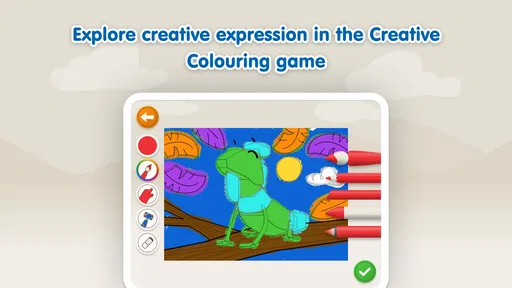
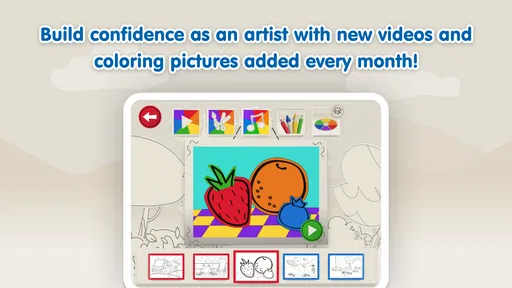
When you first open Colourblocks World, you're greeted by a beautifully designed interface that’s both sleek and intuitive. It’s like stepping into a digital art studio that’s ready to unleash your creativity. The app is designed with simplicity in mind, making it super easy to navigate, even if you’re not tech-savvy. It’s a breath of fresh air in a world cluttered with complicated apps.
The colors are vibrant, and the animations are smooth, making the whole experience feel like a seamless journey through a painter’s palette. The app doesn’t bombard you with ads, which is a massive plus in my book. You can just relax and immerse yourself in the creative process without constant interruptions.
Worth Reading Before You Choose

EA SPORTS FC Mobile 26 Is a Bigger Football Game, but It Takes Time

Flipboard Shows What News Apps Must Do Beyond the Feed

Switching to Android Auto Means Rethinking Your Driving Routine

Google Calendar Makes a Crowded Week Easier to Manage

Ludo King Makes the Most of the Minutes Between Plans

Baby Panda World Brings Quick Play to Modern Phones, but Its Game Library Feels Busy
Features That Stand Out
One of the standout features of Colourblocks World is its extensive library of color palettes. Whether you're looking to create something bright and bold, or soft and muted, there’s a palette here for every mood and occasion. The app even allows you to create custom palettes, which is perfect for those of us who like to have complete control over our creative process.
Another cool feature is the community aspect. You can share your creations with others, and there's a thriving community of users who are more than happy to offer feedback and support. It’s like having a global art studio at your fingertips. Plus, you can get inspired by browsing through the work of other users. It’s a fantastic way to spark your creativity and see what’s possible with this app.
Why You Should Try It
Colourblocks World isn’t just about creating beautiful art; it’s also a fantastic tool for stress relief. There’s something incredibly soothing about playing with colors and shapes, and this app delivers that experience in spades. Whether you’re winding down after a long day or just need a quick creative outlet, this app has got your back.
The app is also perfect for people of all ages. Kids can have a blast experimenting with colors, while adults can enjoy the more intricate features. It’s a rare gem that offers something for everyone, no matter your age or artistic ability.
When another kind of activity is a better fit
In practical terms, I’d choose this for a calm, shared moment rather than as a guaranteed way to occupy a child independently. Sit nearby and ask what they notice; that small bit of interaction can make a colour-focused game more meaningful than simply handing over a phone. A useful routine is to agree on a short session before opening it, then finish by naming a colour from the game and finding something nearby that matches. That gives the activity a natural beginning and end without relying on an invented reward system.
Compared with a colouring app, this game is a better fit if the child is drawn to a themed digital world and wants play to feel like more than filling in a picture. A paper-and-crayon activity is still better for practising hand control and making marks freely, while a straightforward colour-learning exercise may suit families who want a more structured lesson. I would not choose this as a replacement for either. Its strongest role is an accessible, screen-based way to make colour interesting, with an adult available to turn a moment of play into conversation.
What to consider before installing
The game is free to download, but it includes optional in-app purchases priced from $3.99 to $39.99 per item. I’d check the purchase settings on the device before giving it to a child, and make clear that tapping around is not the same as permission to buy something. That is a sensible precaution for any free game with paid items, especially when a young player is exploring menus on their own.
It is rated for Everyone, and the minimum operating system is Android 8.0. The current version is 1.5.9. These details make it easier to judge basic suitability before installing, but the age rating alone does not tell a parent whether the pace, theme, or amount of interaction will suit a particular child. I’d start by playing alongside them and see whether the experience holds their attention comfortably.
There is also a difference between what a child may enjoy and what an adult expects from an educational game. If you want a formal sequence of lessons or a measurable way to track learning, I’d look for an option designed around those needs. If your priority is a bright, low-pressure introduction to colour, this is a more natural match. For older children who need a sustained challenge, a puzzle game with clear rules and increasing complexity is likely to keep them engaged longer.
How the pace holds up over time
When deciding whether a child will stick with it, I would focus less on unlocks and more on whether the central activity remains interesting after the novelty of the colours wears off. A child who likes returning to familiar material may enjoy revisiting it, while one who quickly asks for new rules or harder goals may need something with a more obvious difficulty curve. That difference is not a flaw in either player; it is a useful way to decide whether this is a short occasional choice or a regular part of their routine.
For a realistic everyday use, I can see opening it during a quiet moment at home, perhaps while a caregiver is nearby and has a few minutes to chat. It can also be a reasonable option when a child wants a brief activity before moving on to toys, a book, or an outdoor break. I would avoid relying on it as the only solution for a long wait or a whole afternoon: a single colour-centred game may not offer the variety a child needs for extended entertainment.
Its popularity offers some context, though not a guarantee that it will suit every family. It has passed 100,000 installs and has a 3.7 average rating from 801 ratings, with 53 written reviews. I read that as a reason to approach it with open but measured expectations: enough people have tried it to make it a familiar choice, while the average suggests it is not a universal favourite. The best test is still whether its particular style of play fits the child you have in mind.
Who I would recommend it to
I’d recommend giving it a look if you have a younger child who responds well to colourful themes, enjoys exploring at their own pace, and benefits from an adult joining in now and then. It can also work for a caregiver who wants a simple conversation starter about colours without setting up craft supplies. Blue Zoo has made a game with a clear child-friendly focus, and the Everyone rating aligns with that broad audience.
I would skip it if you are specifically shopping for a deep challenge, detailed learning reports, a competitive game loop, or a substitute for drawing and crafts. I’d also be cautious if your household needs a completely purchase-free experience, since paid items are available. Free entry makes it easy to try, but it does not make every possible use or expectation a good match.
Final Thoughts
All in all, Colourblocks World is a delightful app that combines creativity, community, and relaxation in one neat package. It’s perfect for anyone looking to explore their artistic side or just looking for a fun way to unwind. I highly recommend giving it a try. Who knows, you might just discover a hidden talent or find your new favorite hobby!
So, what are you waiting for? Grab your phone, download the app, and let your creativity run wild. Trust me, you won’t regret it!
Pros
- Engaging gameplay with vibrant design
- Easy to learn
- hard to master mechanics
- Regular updates with new levels
- Supports offline play for convenience
- Family-friendly and suitable for all ages
Cons
- In-app purchases can be pricey
- Ads can be a bit intrusive
- Limited customization options
- No multiplayer mode available
- Occasional performance lags on older devices
FAQs for Colourblocks World
What is Colourblocks World?
Colourblocks World is an engaging and educational app designed for children, offering a vibrant and interactive experience. It combines the fun of coloring with educational elements, helping kids learn colors, shapes, and problem-solving skills in a playful environment. It's available on both Android and iOS platforms.
Is Colourblocks World suitable for all age groups?
Colourblocks World is primarily aimed at young children, typically those in preschool and early elementary grades. The app's content is carefully curated to be age-appropriate, ensuring that it is both educational and entertaining for its target audience. Parental guidance is recommended for very young users.
Are there in-app purchases in Colourblocks World?
Yes, Colourblocks World includes in-app purchases. While the app offers a variety of free content, additional features and levels can be unlocked through purchases. Parents should ensure that purchase settings are secure to prevent unauthorized transactions by children.
Does Colourblocks World require an internet connection?
Colourblocks World can be enjoyed offline once downloaded, which is great for uninterrupted play. However, an internet connection might be required for initial downloads, updates, and accessing certain features like in-app purchases or new content releases.
How does Colourblocks World ensure child safety?
Colourblocks World prioritizes child safety by incorporating age-appropriate content and secure in-app settings. The app is designed to be ad-free, ensuring a safe and distraction-free environment for children. Additionally, parental controls allow for monitoring and managing the app's usage effectively.


